
Uploading and validating config files#
You have now made all the changes necessary to start using the simple hub, but the changes to admin.json and tasks.json are only on your local computer. You want to move them to your GitHub repository.
Uploading changes from your local computer to GitHub#
Follow GitHub directions here for adding files to a repository.
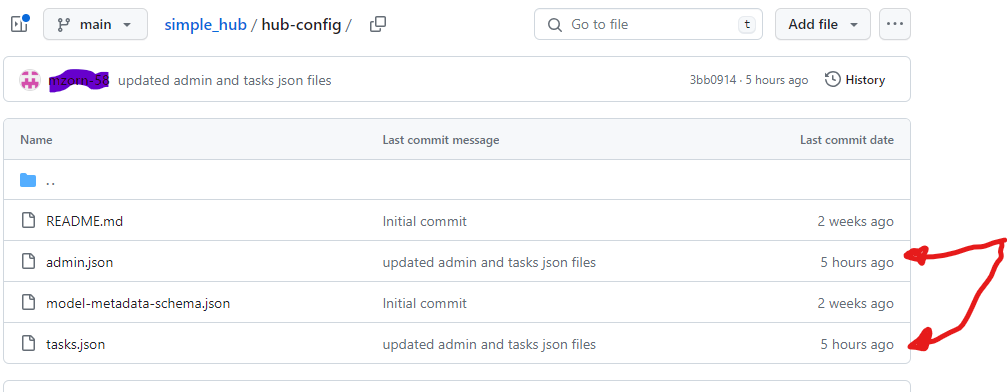
Once you have uploaded those two files onto your GitHub repository, you will notice that they have been updated by looking at the last commit date, as indicated below.
Validating your config files#
Now you should validate the config files, to be sure they are properly functional. You can use the validate_config function from hubAdmin to check whether Hub config files are valid. The steps are as follows:
First, you need to install the R package
hubAdmin. Here are instructions for installinghubAdminin the R console.Next, you need to validate the Hub’s config files.
validate_hub_config()validates theadmin.json,tasks.json,model-metadata-schema.jsonHub config files in a single call.validate_config()a hub config file against a Infectious Disease Modeling Hubs schema.If you do get any errors, you can pass the result of any of the above functions to
view_config_val_errors()which print a concise and informative version of validation errors table.More detailed instructions and explanations.
Congratulations!#
Your simple hub repository is now ready to be used! You created a simple hub and modified the config.json and task.json files. You now have:
Created a hub repository
Cloned the hub repository to your local computer
Configured the modeling hub by:
Modifying
admin.jsonModifying
tasks.json
Uploaded modified files from your local computer to GitHub
Validated config files

Next, it is time to start using your modeling hub.